
Slash LLM Token Costs by 80% with RTK — The Rust CLI Proxy Every AI Developer Needs
Slash LLM Token Costs by 80% with RTK — The Rust CLI Proxy Every AI Developer Needs
If you use AI coding tools like Claude Code, Cursor, or Codex daily, you've probably noticed something: a huge chunk of your tokens go to noise. Directory listings, git status output, test runner logs, build error walls — your LLM reads every single line, and you pay for every token.
RTK (Rust Token Killer) is a lightweight CLI proxy that sits between your AI agent and the shell. It transparently rewrites commands, filters output, and compresses results — delivering 60-90% token savings with no changes to your workflow.
In this tutorial, you'll learn what RTK is, how it works, and how to set it up in under 5 minutes.
What Is RTK?
RTK is a single Rust binary (no dependencies, <10ms overhead) that acts as a transparent proxy for shell commands executed by AI coding agents. When your AI tool runs a command like git status or cargo test, RTK intercepts it, runs the actual command, then filters and compresses the output before it reaches the LLM context window.
Key features:
- 100+ supported commands — git, cargo, npm, docker, kubectl, AWS CLI, test runners, linters, and more
- Smart filtering — strips noise (comments, whitespace, boilerplate) while keeping semantics
- Grouping & deduplication — aggregates similar items, collapses repeated log lines
- Auto-rewrite hook — one
rtk init -gcommand hooks into your AI tool transparently - Built-in analytics —
rtk gainshows your token savings in real time
Architecture Overview
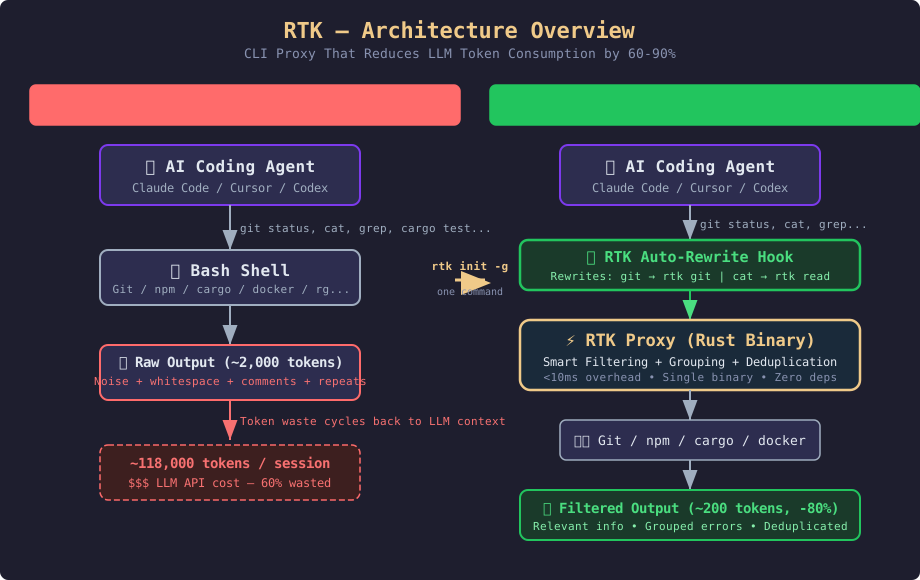
The diagram above shows the key difference:
Without RTK (left): Your AI agent sends a command to the shell, gets back a raw, verbose output (~2,000 tokens for git status), and feeds all that noise back into the LLM context. Over a 30-minute session, this adds up to ~118,000 tokens — and you pay for every one.
With RTK (right): Your AI agent sends the same command, but the RTK auto-rewrite hook transparently routes it through the RTK proxy. The proxy executes the real command, applies four filtering strategies (smart filtering, grouping, truncation, deduplication), and returns a compact output (~200 tokens for git status). The AI agent never knows the difference — it just gets cleaner, cheaper results. Total: ~23,900 tokens per session (~80% savings).
Why It's Trending
RTK exploded from launch to 41,600+ GitHub stars in just a few months. Why?
- AI coding adoption is skyrocketing — everyone using Claude Code, Cursor, Codex, or Windsurf burns tokens on shell output
- Token costs matter — at API pricing, saving 80% of ~118K tokens per session adds up fast
- Zero friction — single binary, one command to install, zero config for most users
- Active development — pushed daily, 808 issues tracked, 12 supported AI tools
Prerequisites
- A Unix-like system (Linux, macOS) or WSL on Windows
- An AI coding tool: Claude Code, Cursor, Codex, Gemini CLI, Windsurf, or any of the 12 supported agents
curlorbrewfor installation- Rust toolchain (optional — only needed if installing via Cargo)
Installation
RTK offers multiple installation methods. Pick one:
Homebrew (macOS / Linux)
brew install rtkQuick Install Script (Linux / macOS / WSL)
curl -fsSL https://raw.githubusercontent.com/rtk-ai/rtk/refs/heads/master/install.sh | shThis installs to ~/.local/bin. Add to your PATH if needed:
echo 'export PATH="$HOME/.local/bin:$PATH"' >> ~/.zshrcCargo (if you have Rust installed)
cargo install --git https://github.com/rtk-ai/rtkVerify Installation
rtk --version # Should show "rtk 0.28.2" or laterIf you see rtk gain showing stats, you're good.
Setting Up the Auto-Rewrite Hook
The real magic is the auto-rewrite hook. It transparently intercepts every Bash command your AI tool runs and rewrites it to its rtk equivalent.
For Claude Code / GitHub Copilot (default)
rtk init -gThen restart Claude Code. That's it.
For Other AI Tools
rtk init -g --gemini            # Gemini CLI
rtk init -g --codex             # Codex (OpenAI)
rtk init --agent cursor         # Cursor
rtk init --agent windsurf       # Windsurf
rtk init --agent cline          # Cline / Roo Code
rtk init --agent kilocode       # Kilo Code
After restarting your AI tool, run a simple command like git status. The output should be much more compact than usual.
How It Works — The Four Strategies
RTK applies four strategies depending on the command type:
1. Smart Filtering
Removes noise: comments, whitespace, boilerplate headers, progress bars, non-essential metadata.
2. Grouping
Aggregates similar items: files by directory, errors by type, test results by status.
3. Truncation
Keeps the relevant context (e.g., failure details) while cutting redundancy (passing tests, successful steps).
4. Deduplication
Collapses repeated log lines with counts instead of printing them hundreds of times.
Commands You'll Use Daily
Here are the most impactful RTK commands:
File operations:
rtk ls .                        # Compact directory tree
rtk read file.rs                # Smart file reading
rtk find "*.rs" .               # Compact find
rtk grep "pattern" .            # Grouped search results
Git operations (huge savings):
rtk git status                  # Compact status (~200 vs ~2,000 tokens)
rtk git log -n 10               # One-line commits
rtk git diff                    # Condensed diff (~500 vs ~2,000 tokens)
rtk git push                    # -> "ok main" (~10 vs ~200 tokens)
Test runners:
rtk cargo test                  # Failures only (-90%)
rtk pytest                      # Python tests (-90%)
rtk go test                     # Go tests (-90%)
rtk jest                        # Jest compact
Build & lint:
rtk cargo build                 # Compact (-80%)
rtk cargo clippy                # Compact (-80%)
rtk tsc                         # TypeScript errors grouped by file
rtk lint                        # ESLint grouped by rule/file
Containers & cloud:
rtk docker ps                   # Compact container list
rtk docker compose ps           # Compose services
rtk kubectl pods                # Compact pod list
rtk kubectl logs                # Deduplicated logs
rtk aws ec2 describe-instances  # Compact instance list
Tracking Your Savings
RTK's analytics show exactly how much you're saving:
rtk gain                        # Summary stats
rtk gain --graph                # ASCII graph (last 30 days)
rtk gain --history              # Recent command history
rtk gain --daily                # Day-by-day breakdown
rtk gain --all --format json    # JSON export
You can also discover missed opportunities:
rtk discover                    # Find commands RTK could optimize
rtk discover --all --since 7    # All projects, last 7 days
Configuration
RTK is zero-config by default, but you can customize it:
~/.config/rtk/config.toml:
[hooks]
exclude_commands = ["curl", "playwright"]  # skip rewrite for these

[tee]
enabled = true          # save raw output on failure
mode = "failures"       # "failures", "always", or "never"
When a command fails, RTK saves the full unfiltered output so the LLM can read it without re-executing.
Verification Checklist
rtk --versionshows a version numberrtk init -gcompleted without errors- After restarting your AI tool,
git statusoutput is compact rtk gainshows token savings across recent sessions- Auto-rewrite works: you didn't have to type
rtkmanually - For WSL users: hook works natively inside WSL
Comparison: RTK vs Alternatives
| Approach | Token Savings | Setup Time | Dependencies |
|---|---|---|---|
| RTK | 60-90% | 1 minute | Zero (single Rust binary) |
| Manual prompt engineering | Variable | Hours | None |
| Custom shell scripts | 20-50% | 30 minutes | Shell tools |
| No optimization | 0% | 0 minutes | None |
RTK wins on every metric — highest savings, fastest setup, no runtime dependencies.
Resources
- GitHub: github.com/rtk-ai/rtk
- Website: rtk-ai.app
- User Guide: rtk-ai.app/guide
- Discord Community: discord.gg/RySmvNF5kF
- Supported Agents Guide: rtk-ai.app/guide/getting-started/supported-agents
- Configuration Reference: rtk-ai.app/guide/getting-started/configuration
- License: MIT / Apache 2.0