Open Design — The Open-Source Alternative to Claude Design
Open Design — The Open-Source Alternative to Claude Design
When Anthropic released Claude Design in April 2026, it changed how people think about AI-assisted design. Instead of generating prose, the model started shipping real design artifacts — HTML pages, magazine layouts, mobile mockups, pitch decks — right inside the chat. It went viral overnight.
But there was a catch: Claude Design was closed-source, cloud-only, paid-only, and locked to Anthropic's model. You couldn't self-host it, couldn't swap in your own agent, couldn't extend it with custom skills, and couldn't deploy the output anywhere without exporting.
Open Design (OD) is the answer. It's an open-source (Apache-2.0), local-first design platform that replicates the Claude Design workflow — but runs entirely on your laptop, works with 16 different AI coding agents (Claude Code, Codex, Gemini CLI, and more), ships 31 built-in design skills, 72+ brand-grade design systems, and generates production-grade HTML prototypes, slide decks, mobile mockups, social carousels, and even videos. All with your own API keys and zero cloud lock-in.
Why Open Design Is Trending
Open Design hit GitHub on April 28, 2026, and crossed 38,000+ stars in just two weeks. Here's why it's getting so much attention:
- Local-first, BYOK design. Every AI interaction stays on your machine. The daemon detects whichever coding CLI you already have installed and delegates design work to it — no separate subscription, no Anthropic lock-in.
- 16 coding-agent CLIs supported. Claude Code, OpenAI Codex, Devin for Terminal, Cursor Agent, Gemini CLI, OpenCode, Qwen Code, Qoder CLI, GitHub Copilot CLI, Hermes (ACP), Kimi CLI, Pi, Kiro CLI, Kilo, Mistral Vibe CLI, and DeepSeek TUI — all auto-detected on your PATH.
- 31 skills + 72 design systems. From web prototypes to pitch decks to social carousels to PM specs. Design systems follow the portable DESIGN.md schema — switch from Linear's palette to Stripe's with one click.
- Docker support. One docker compose up -d and you're running. No Node.js or pnpm needed.
- Claude Design ZIP import. Already have a Claude Design export? Drop it on the welcome dialog — OD converts it into a real project so your local agent can keep editing where Anthropic left off.
Architecture
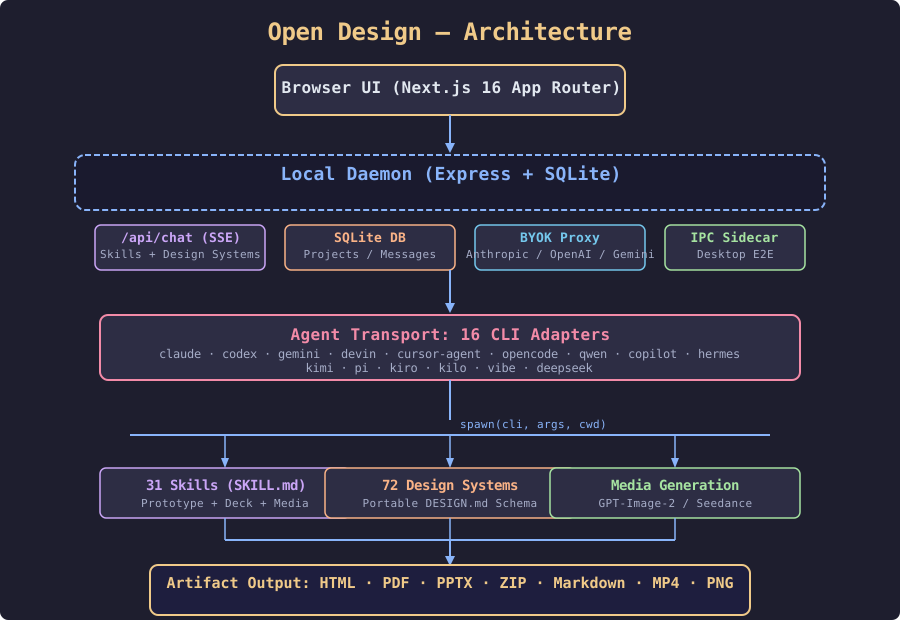
The architecture has three layers:
Web Layer (Next.js 16) — The browser-based UI: chat interface, file workspace, sandboxed iframe preview, settings panel, and import dialogs.
Daemon Layer (Express + SQLite) — The core server that runs locally. It routes API calls, manages the SQLite database (projects, conversations, messages, tabs, templates), serves design systems and skills, and handles multi-provider BYOK proxy with SSRF blocking.
Agent Transport — The daemon spawns your chosen coding CLI as a child process, giving it real Read, Write, Bash, and WebFetch tools against a physical artifact folder.
Prerequisites
- Docker Desktop (or any Docker environment with Compose v2)
- A coding-agent CLI on your PATH (optional but recommended)
- An API key for the BYOK fallback (Anthropic, OpenAI, Azure OpenAI, or Google Gemini)
Setup with Docker
Getting Open Design running is a three-command process:
git clone https://github.com/nexu-io/open-design.git
cd open-design/deploy
docker compose up -d
Open your browser to:
http://localhost:7456Common Docker Commands
# View logs
docker compose logs -f

# Restart
docker compose restart

# Stop
docker compose down

# Pull latest version
docker compose pull
docker compose up -d
Running from Source
git clone https://github.com/nexu-io/open-design.git
cd open-design
corepack enable
pnpm install
pnpm tools-dev run web
This requires Node.js ~24 and pnpm 10.33.x.
Usage Walkthrough
-
Pick a skill. Choose from 27 prototype skills (web prototype, SaaS landing, dashboard, mobile app, social carousel, magazine poster, motion frames) or 4 deck skills.
-
Choose a design system. Pick from 72+ systems (Linear, Stripe, Vercel, Airbnb, Notion, Apple, Cursor, Supabase, Figma, and more).
-
Write your brief. The prompt stack kicks in with an interactive question form that locks down surface, audience, tone, and constraints. If no brand is specified, a direction picker offers 5 curated visual directions. The daemon spawns your agent CLI in a real project folder.
-
Preview and export. The artifact renders in a sandboxed iframe. Download as HTML, PDF, PPTX, ZIP, or Markdown.
Key Features
Multi-Model Flexibility
- Local CLI agent: Auto-detected on PATH — Claude Code, Codex, Gemini CLI, etc.
- BYOK proxy: POST /api/proxy/{anthropic,openai,azure,google}/stream with any baseUrl + apiKey + model. Supports OpenAI-compatible endpoints (DeepSeek, Groq, OpenRouter, Ollama, LM Studio). SSRF-guarded.
Media Generation
Beyond code, Open Design generates images via gpt-image-2, videos via Seedance 2.0 and HyperFrames, and ships 93 ready-to-replicate prompt templates.
Anti-AI-Slop Design Culture
- Question form first — never a single blank prompt
- Brand-color extraction protocol
- 5-dimensional self-critique before every artifact emission
- P0/P1/P2 checklists per skill
- Explicit slop blacklist
Claude Design Import
Drop a .zip export from Claude Design onto the welcome dialog. The daemon extracts it into a real project folder with the entry file open as a tab.
MCP Server
Open Design ships a read-only stdio MCP server. Wire it into Claude Code, Codex, Cursor, or any MCP-compatible client.
Comparison
- Claude Design: Closed-source, cloud-only, Anthropic-only, subscription-based, no self-host
- Open CoDesign: MIT-licensed, desktop Electron app, bundles pi-ai, 12 skills, no Docker deploy
- Open Design: Apache-2.0, web app + local daemon, 16 CLI agents + BYOK proxy, 31 skills + 72 design systems, Docker-ready, Vercel-deployable
Resources
- GitHub: github.com/nexu-io/open-design
- Website: open-design.ai
- Discord: discord.gg/qhbcCH8Am4
- X / Twitter: @nexudotio
- License: Apache-2.0