
CubeSandbox — Instant, Secure KVM Sandboxes for AI Agents (Self-Hosted Guide)
CubeSandbox — Instant, Secure KVM Sandboxes for AI Agents
What is CubeSandbox?
CubeSandbox is an open-source, high-performance sandbox service built by Tencent Cloud that launches hardware-isolated MicroVMs for AI agents in under 60 milliseconds. Each sandbox runs its own dedicated Guest OS kernel — no shared kernel, no container escape risks — yet consumes less than 5 MB of memory overhead per instance.
GitHub: github.com/tencentcloud/CubeSandbox
Stars: ⭐ 5,500+
License: Apache 2.0
Language: Rust
Created: April 2026
Why this matters: AI agents executing LLM-generated code need isolation. Docker's shared-kernel approach (namespace isolation) has known escape vectors. Traditional VMs are too slow and memory-heavy to spin up per agent request. CubeSandbox bridges this gap — KVM-level isolation at Docker-level speed and density. It's also a drop-in E2B replacement: swap one environment variable to migrate from the expensive E2B Cloud service to your own self-hosted sandbox.
Key Features
- <60 ms cold start — Pre-provisioned resource pools and snapshot cloning skip initialization entirely
- <5 MB RAM per sandbox — Copy-on-Write memory reuse and aggressively stripped runtime
- True kernel-level isolation — Dedicated Guest OS kernel per sandbox, not shared namespaces
- E2B SDK compatible — Drop-in replacement. Change
E2B_API_URLand you're done - eBPF network security — CubeVS enforces inter-sandbox network isolation with fine-grained egress policies
- One-click deploy — Single-node or multi-node cluster via a single install script
- PVM support — Runs on ordinary cloud VMs without bare-metal (nested virtualization via page-table-based VM)
Comparison: CubeSandbox vs Docker vs Traditional VMs
| Metric | Docker Container | Traditional VM | CubeSandbox |
|---|---|---|---|
| Isolation Level | Low (shared kernel) | High (dedicated kernel) | Extreme (dedicated kernel + eBPF) |
| Cold Start | ~200 ms | Seconds | <60 ms |
| Memory Overhead | Low (shared kernel) | High (full OS) | Ultra-low (<5 MB) |
| Deployment Density | High | Low | Extreme (thousands per node) |
| E2B SDK Compatible | No | No | ✅ Drop-in |
Architecture Overview
CubeSandbox uses a layered architecture built on KVM MicroVMs, with a REST API gateway, cluster orchestrator, and eBPF-powered virtual switch for network isolation.
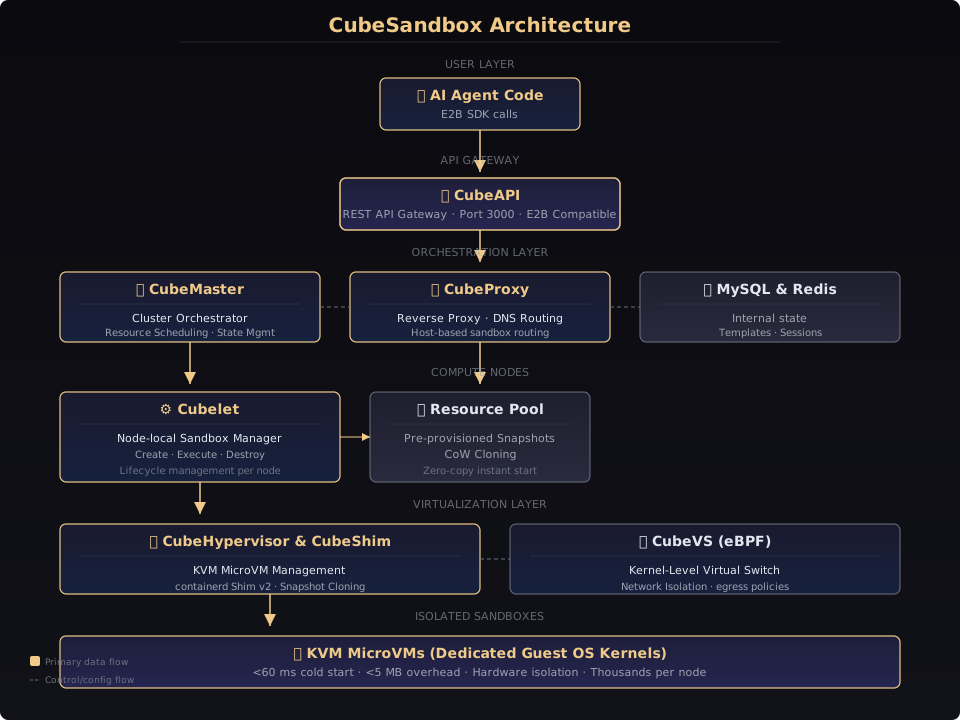
Here's how the system works:
- User/Agent Code calls the E2B SDK, which sends requests to the CubeAPI REST gateway (port 3000)
- CubeAPI forwards requests to CubeMaster, the cluster orchestrator that manages resource scheduling and cluster state
- CubeMaster dispatches sandbox requests to the appropriate Cubelet (one per compute node)
- Cubelet manages the full lifecycle of sandbox instances on its node — creation, execution, teardown
- CubeProxy provides reverse proxying and DNS-based request routing to individual sandbox instances
- CubeHypervisor & CubeShim form the virtualization layer — managing KVM MicroVMs and integrating with the container runtime via containerd Shim v2
- CubeVS (eBPF virtual switch) enforces kernel-level network isolation and security policies between sandboxes
- The Resource Pool pre-provisions snapshots for instant sandbox creation via CoW cloning
Prerequisites
- An x86_64 Linux server with:
- 4+ CPU cores (8+ recommended)
- 8 GB+ RAM (16 GB+ recommended for multiple sandboxes)
- 300 GB+ disk (for sandbox images and templates)
- Root access
- Docker and Docker Compose (for CubeAPI, MySQL, Redis dependencies)
- A domain or IP for accessing the sandbox API
- For standard cloud VMs: follow the PVM deployment path (no bare-metal required)
Step-by-Step Setup Guide
Step 1: Provision a Server and Install the PVM Kernel
CubeSandbox requires KVM support. Standard cloud VMs (AWS EC2, DigitalOcean, Hetzner) don't expose hardware virtualization — so CubeSandbox provides PVM (Pagetable-based Virtual Machine), a page-table-based nested virtualization framework that works on any cloud VM.
First, provision an x86_64 cloud server running OpenCloudOS 9 (recommended for best compatibility). Log in as root:
sudo su rootDownload and install the PVM host kernel from the CubeSandbox Releases page. Find the kernel-*cube.pvm.host*.x86_64.rpm attachment for RPM-based systems:
# Replace with the actual URL from the releases page
wget "https://github.com/TencentCloud/CubeSandbox/releases/download/v0.1.0/kernel-devel-5.14.0_cube.pvm.host.x86_64.rpm"
rpm -ivh --oldpackage kernel-*.rpm
Set the PVM kernel as the default boot entry:
grubby --info=ALL | grep -E "^kernel|^index"
# Find the PVM kernel index, then:
grubby --set-default-index=<INDEX>
grubby --default-kernel
Configure kernel boot parameters:
curl -sL https://github.com/tencentcloud/CubeSandbox/raw/master/deploy/pvm/grub/host_grub_config.sh | bashReboot and verify:
rebootAfter reboot:
uname -r
# Should contain: cube.pvm.host

modprobe kvm_pvm
lsmod | grep kvm
# Should show kvm_pvm

# Make it persistent
echo 'kvm_pvm' > /etc/modules-load.d/kvm-pvm.conf
Step 2: Install CubeSandbox
Run the one-click installer as root:
curl -sL https://github.com/tencentcloud/CubeSandbox/raw/master/deploy/one-click/online-install.sh | CUBE_PVM_ENABLE=1 bashThis installs:
- CubeAPI — E2B-compatible REST API on port 3000
- CubeMaster + Cubelet — cluster orchestration components as host processes
- CubeProxy — TLS (mkcert) and CoreDNS domain routing (
cube.app) - CubeShim + CubeVS — virtualization and network isolation layer
- MySQL + Redis — managed via Docker Compose for internal state
Step 3: Create a Sandbox Template
A template is a pre-built MicroVM image that sandboxes are cloned from. Create one from the official code interpreter image:
cubemastercli tpl create-from-image \
--image cube-sandbox-int.tencentcloudcr.com/cube-sandbox/sandbox-code:latest \
--writable-layer-size 1G \
--expose-port 49999 \
--expose-port 49983 \
--probe 49999
Monitor the build progress:
cubemastercli tpl watch --job-id <job_id>Wait until the template status shows READY. Note the template ID (template_id) — you'll need it in the next step. The initial image download and extraction may take a few minutes.
Step 4: Run Your First Sandbox
Install the Python SDK (E2B compatible SDK):
pip install e2b-code-interpreterSet environment variables:
export E2B_API_URL="http://127.0.0.1:3000"
export E2B_API_KEY="dummy"
export CUBE_TEMPLATE_ID="<your-template-id>"
export SSL_CERT_FILE="/root/.local/share/mkcert/rootCA.pem"
Run code inside an isolated sandbox:
import os
from e2b_code_interpreter import Sandbox

with Sandbox.create(template=os.environ["CUBE_TEMPLATE_ID"]) as sandbox:
    result = sandbox.run_code("print('Hello from Cube Sandbox, safely isolated!')")
    print(result.text)
Step 5: Execute Shell Commands
Beyond Python code execution, you can run arbitrary shell commands:
with Sandbox.create(template=os.environ["CUBE_TEMPLATE_ID"]) as sandbox:
# Run shell commands
proc = sandbox.commands.run("uname -a")
print(proc.stdout)

# Install packages
sandbox.commands.run("pip install numpy pandas matplotlib")

# File operations
sandbox.filesystem.write("/tmp/data.txt", "some data")
content = sandbox.filesystem.read("/tmp/data.txt")
print(content)
Step 6: Use with OpenAI Agents SDK
CubeSandbox integrates seamlessly with the OpenAI Agents SDK via the E2BSandboxClient:
from agents import Agent, Runner
from agents.sandbox import E2BSandboxClient
import os

sandbox_client = E2BSandboxClient(
    api_url=os.environ["E2B_API_URL"],
    api_key=os.environ["E2B_API_KEY"],
    template_id=os.environ["CUBE_TEMPLATE_ID"],
)

agent = Agent(
    name="Code Assistant",
    instructions="You write and execute Python code to solve problems.",
    sandbox_client=sandbox_client,
)

result = Runner.run_sync(agent, "Calculate the first 20 Fibonacci numbers and plot them.")
print(result.final_output)
Verification Checklist
- PVM kernel is active:
uname -rcontainscube.pvm.host - KVM module loaded:
lsmod | grep kvmshowskvm_pvm - CubeAPI is running:
curl -s http://127.0.0.1:3000/healthreturns 200 - Template created:
cubemastercli tpl listshows a template withREADYstatus - Sandbox creates successfully: Python script with
Sandbox.create()completes without errors - Code execution works:
sandbox.run_code("print('hello')")returns the expected output - Shell commands work:
sandbox.commands.run("echo test")returns stdout - File operations work: write/read cycle completes without errors
- Multiple concurrent sandboxes can be created (test with 3-5 simultaneous requests)
- Network isolation: one sandbox cannot reach another sandbox's internal IP
Use Cases
AI Agent Code Execution — The primary use case. Let LLM agents execute generated code in isolated MicroVMs without risk of host compromise.
RL Training Environments — CubeSandbox can fork sandboxes at millisecond granularity (event-level snapshot rollback coming soon), enabling rapid exploration environments for reinforcement learning.
Browser Automation — Run headless Chromium inside a sandbox and control it via Playwright/CDP, completely isolated from the host.
SWE-bench Evaluation — Automate coding task evaluation in isolated sandboxes. CubeSandbox ships with a mini-swe-agent integration example.
Multi-tenant Code Execution — Offer a code execution service where each user's code runs in a dedicated kernel-isolated sandbox.
Troubleshooting
"kvm: module not found" after PVM kernel install
→ Verify you rebooted into the PVM kernel (uname -r). If the old kernel loaded, check GRUB default and reboot again.
Sandbox creation fails with "no template found"
→ Ensure the template creation completed (cubemastercli tpl watch shows READY). Verify CUBE_TEMPLATE_ID is set correctly.
"Connection refused" when hitting port 3000
→ Check CubeAPI is running: systemctl status cube-api. Check logs: journalctl -u cube-api -f.
Sandbox creation timeout → The first sandbox creation downloads the template image and takes longer. Subsequent creations should be instant (<60 ms).
PVM kernel install fails on Debian/Ubuntu
→ Make sure you're using the .deb package variant from the releases page, not the .rpm.